LED Screen Module Buying Guide: Why the Cheaper Module Costs You More
The LED screen modules inside a display typically account for only 15%–25% of the screen's price, yet they decide how that screen looks and what it costs to maintain for the next five years. This guide walks you through the full module math, so a low quote can't lead your project astray.
- The quote that saved 8% — and paid it back twice
- What's actually inside an LED screen module
- Pixel pitch: how close can your viewers stand?
- Same spec sheet, different picture — why
- The five-year math: module price is just the tip
- A 5-step selection flow you can use in any sourcing meeting
- The 5 traps buyers fall into most often
- Key takeaways
1. The quote that saved 8% — and paid it back twice
Here's a scene we run into every year. Two clients each installed a 60 m² indoor screen the same year. Client A pushed the LED screen module unit price down to the lowest on the market — on handover day, the two screens looked nearly identical. Client B spent just under 8% more on modules and required same-batch shipment with binning reports attached.
Two years later the gap showed up. Color patches and dark lines started appearing on Screen A; when modules were swapped, the original spec had already been discontinued, so replacement modules from a different batch were mixed in — and the mismatch got worse every time. Screen B needed nothing but routine care, and its brightness was still uniform.
The issue isn't the old saying "you get what you pay for" — it's what makes modules special in the bill of materials: a module is the smallest complete display unit in the screen, and the smallest replaceable one. Its quality is nearly invisible on handover day, then compounds over two or three years into repair bills, downtime and reputation damage.
2. What's actually inside an LED screen module
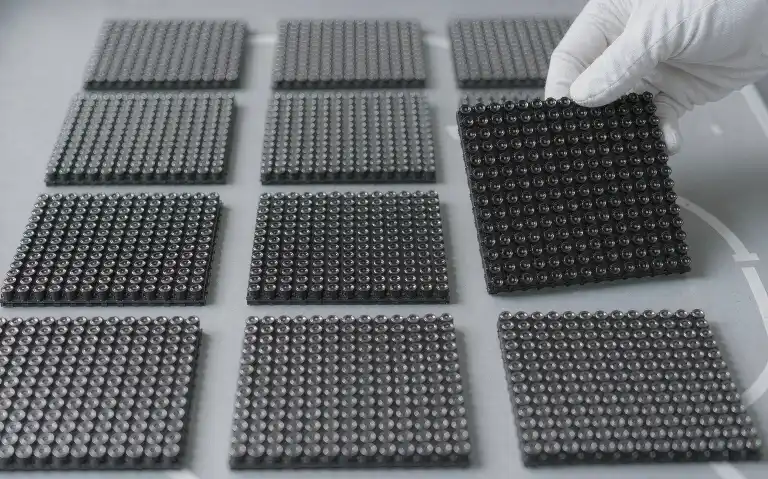
An LED display module is a self-contained display unit that integrates LED lamps, driver ICs, a PCB, a mask and connectors. A full video wall is, in essence, a jigsaw of dozens or hundreds of these modules. Open one up and each of the five parts owns one job:
Diagram: the main layers of an LED display module, from the front face (lamps) to the back (driver ICs, connectors).
How to read the three key numbers on a spec sheet
① Pixel pitch: the center-to-center distance between adjacent LEDs. P2.5 means 2.5 mm. A smaller pitch packs more pixels into each square meter, giving a sharper image — at a higher price.
② Module size: commonly 320×160 mm, 256×128 mm or 192×192 mm. Module dimensions determine how the wall is tiled and how many cabinets you'll need.
③ Module resolution: a 320×160 mm P2.5 module resolves 128×64 pixels. Multiply module resolution by the module count in each direction to get the wall's total resolution — that decides whether your video source fits the screen.
3. Pixel pitch: how close can your viewers stand?
Choosing pitch isn't "smaller is better" — it's "match the viewing distance". A widely used rule of thumb: minimum viewing distance in meters ≈ the pitch number in millimeters. Viewers more than 2.5 m from a P2.5 screen can no longer make out individual pixels.
Indicative industry values for quick estimates; final selection should also weigh mounting height, content type and budget.
Two practical notes. For close-range spaces — meeting rooms, retail floors — an oversized pitch shows visible pixel grain and undercuts the content you paid to show. For rooftop or roadside screens viewed from far away, buying a fine pitch spends budget where no viewer can see the difference. Fix the main viewing distance first, then work back to pitch; this one step typically saves 20%–40% of the budget (typical range).
4. Same spec sheet, different picture — why
Two spec sheets can both read P2.5, 3840 Hz refresh, 800 nits — and the walls they produce can still look dramatically different. The difference hides in four places a spec sheet doesn't spell out:
Even lamps from one encapsulation batch vary in brightness and color temperature. Proper binning keeps same-grade lamps in the same module batch. Mixed bins show up as visible color patches.
Driver ICs govern grayscale, refresh rate and low-brightness performance. Budget ICs shift color at high gray levels and show scan lines on camera.
Post-assembly flatness decides how the wall reads up close. Poor flatness shows "waves" and bright lines under raking light — a top source of warranty complaints.
A blacker mask means higher contrast. Cheap masks reflect light and yellow over time, washing the image out under sunlight or spotlights.
Buyer's tip: all four items can be verified. Ask suppliers for lamp brand and batch reports, driver IC part numbers, written flatness acceptance criteria and mask material specs. A supplier willing to put those into the contract has earned a place in your price comparison.
5. The five-year math: module price is just the tip
Back to our two screens. Stacking up five years of costs, the purchase price differs by only 30 index points (indexed to the budget option's purchase price = 100), yet the five-year total differs by about 130:
Illustrative index (budget option's purchase price = 100), shown to explain the cost structure; size up your own project with real quotes and service terms.
The budget module's hidden bill arrives through four channels: repeated repairs driven by above-spec dead-pixel rates, non-standard replacements after the original spec is discontinued, access and labor costs every time a module is swapped, and brand damage while the screen runs visibly flawed. For revenue-generating installations — retail, showrooms, rental — a single day of downtime often costs more than the entire "saving".
Quality modules are the easier math: low factory dead-pixel rates, tight batch consistency and a spec that stays in supply for years. Over the full lifecycle, modules are usually the 15%–25% of the screen you can least afford to cheapen.
6. A 5-step selection flow you can use in any sourcing meeting
Everything above condenses into a sequence you can run before signing anything:
The five-step LED screen module selection flow: from scene definition to after-sales confirmation — skip a step and the risk lands after handover.
Step 4 is the one buyers skip most, and the one worth insisting on: same batch, same bin. Requiring all modules to come from a single production batch with binning reports is the cheapest insurance you can buy for image uniformity. Step 5 decides whether you still have options five years from now — lock the spare-part supply window and the successor spec before you sign.
7. The 5 traps buyers fall into most often
Comparing unit price only, not batch consistency. Two equally priced quotes can come from entirely different lamp batches — and show it once installed on the same wall.
Not asking for lamp and driver IC part numbers. "Imported lamps" is not an answer. Brand, part number and batch reports are what make a claim enforceable in a contract.
Ignoring flatness acceptance criteria. Inspecting only from straight ahead hides it; shine light across the wall at an angle and every seam appears. Put flatness limits in the contract.
Forgetting about spare parts. Module specs iterate fast, and same-spec discontinuation within two years is common. Lock spares and successor options at order time.
Treating "high refresh, high brightness" as universal. Match them to the scene: high refresh indoors prevents scan lines on camera; high brightness outdoors fights ambient light. Spend in the wrong direction and it's wasted.
8. Key takeaways
| Point | Remember this |
|---|---|
| The module's role | An LED screen module is the wall's smallest complete display unit and its smallest replaceable unit — 15%–25% of price, 100% of the five-year experience |
| Five components | Lamps set brightness and color; driver ICs set grayscale and refresh; PCB carries and cools; the mask sets black level; connectors set seam flatness |
| Choosing pitch | Min viewing distance (m) ≈ pitch (mm). Fix the viewing distance first, then choose the pitch |
| Beyond the spec sheet | Binning, driver IC grade, flatness and mask blackness are the real quality dividing lines |
| Cost perspective | The module price gap is small money; five years of repairs, swaps and downtime is the real bill. Compare on lifecycle cost |
| The critical move | Same batch, written acceptance criteria and a spare-part commitment — all in the contract before you order |
Frequently asked questions
Q1: What's the difference between an LED screen module and an LED display?
A module is the self-contained display unit that makes up the wall — LED lamps, driver ICs, PCB, mask and connectors. An LED display is the complete system: modules plus cabinets, power supplies, control system and structure. Price and inspect them separately.
Q2: P2.5 modules cost noticeably more than P3 — which should I pick?
Let viewing distance decide. If viewers can get within 3 meters, choose P2.5. If they stay beyond 3 meters, P3's pixel grain is essentially invisible — spend the savings on lamp and driver IC grade instead.
Q3: If one module fails, do I have to replace the whole screen?
No. Modules are individually replaceable; a single module or row can be swapped in normal cases. The catch is having same-batch spares — mixing batches after the fact creates visible color mismatch, which is exactly why spares should be locked at order time.
Q4: Can outdoor modules and indoor modules be used interchangeably?
Not recommended. Outdoor modules need higher brightness, waterproofing and thermal design, so their cost structure differs. Indoor modules fail quickly outdoors; outdoor modules indoors waste brightness and look grainy up close. Neither direction pays.
Q5: How can I tell whether a supplier's modules are consistently good?
Check three things: whether they'll provide lamp brand and batch reports, driver IC part numbers and binning reports; whether they publish written flatness and dead-pixel acceptance criteria; and whether they commit to a spare-part supply window. All three present means the quality claim is credible.
Comparing LED screen module quotes right now?
Send us your project scene and viewing distance — we'll reply within 24 hours with a selection proposal including batch reports and a five-year cost estimate.
Get a selection proposalThis article is an original technical summary. Figures are typical industry ranges or illustrative indexes; actual values depend on project specifications and on-site measurement. Reposting is welcome with attribution and a link to the original.